Procurist

Generate FF&E Schedules to match your drawings and briefs, automatically add and update product data in a single click.

Procurist auto-generates FF&E schedules from your floor plans and briefs, populated with real product data, specifications, and trade pricing from vetted European furniture and lighting brands. No spreadsheets. No manual data entry. No chasing suppliers for specs.

Built by an interior designer who ran her own studio.

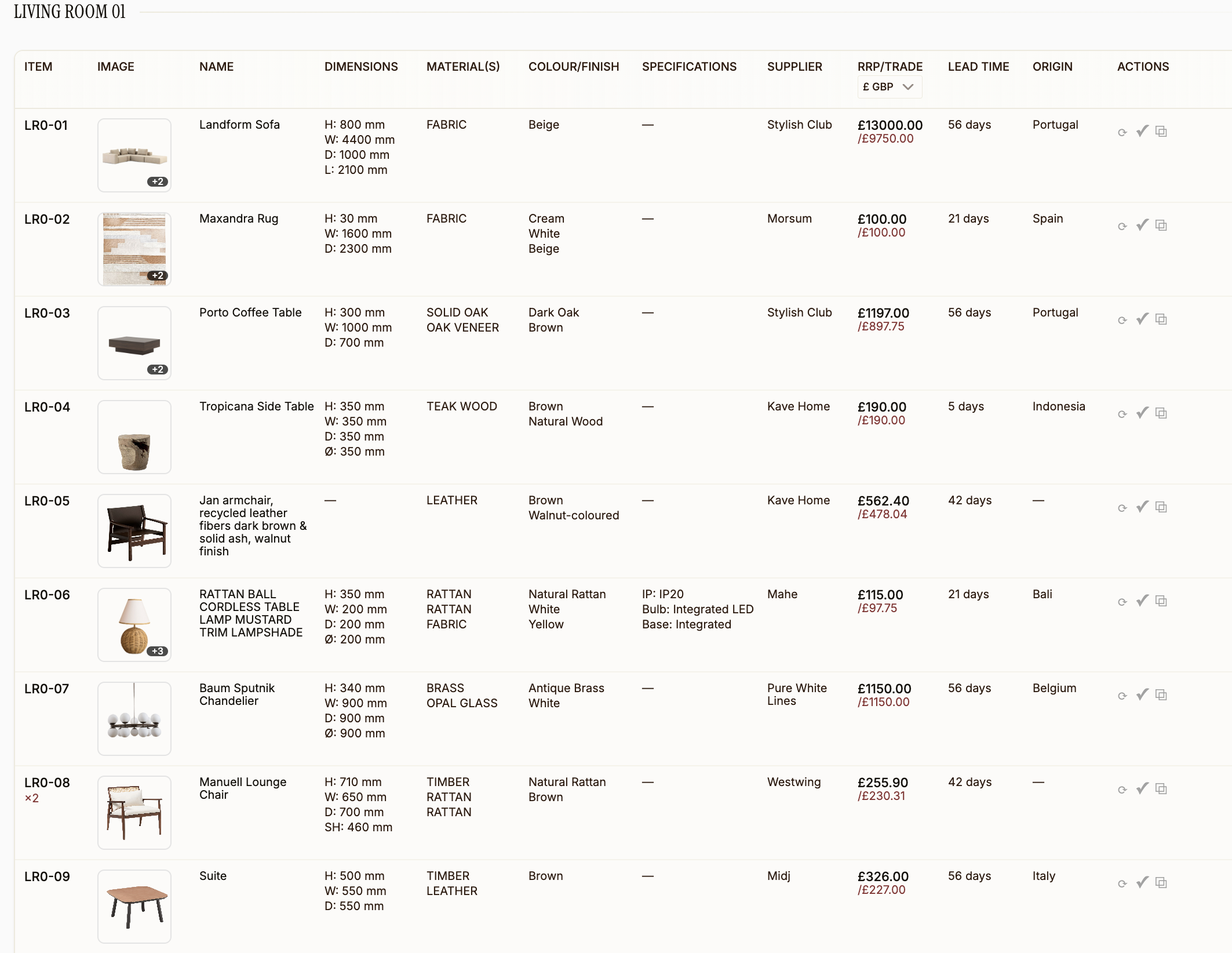
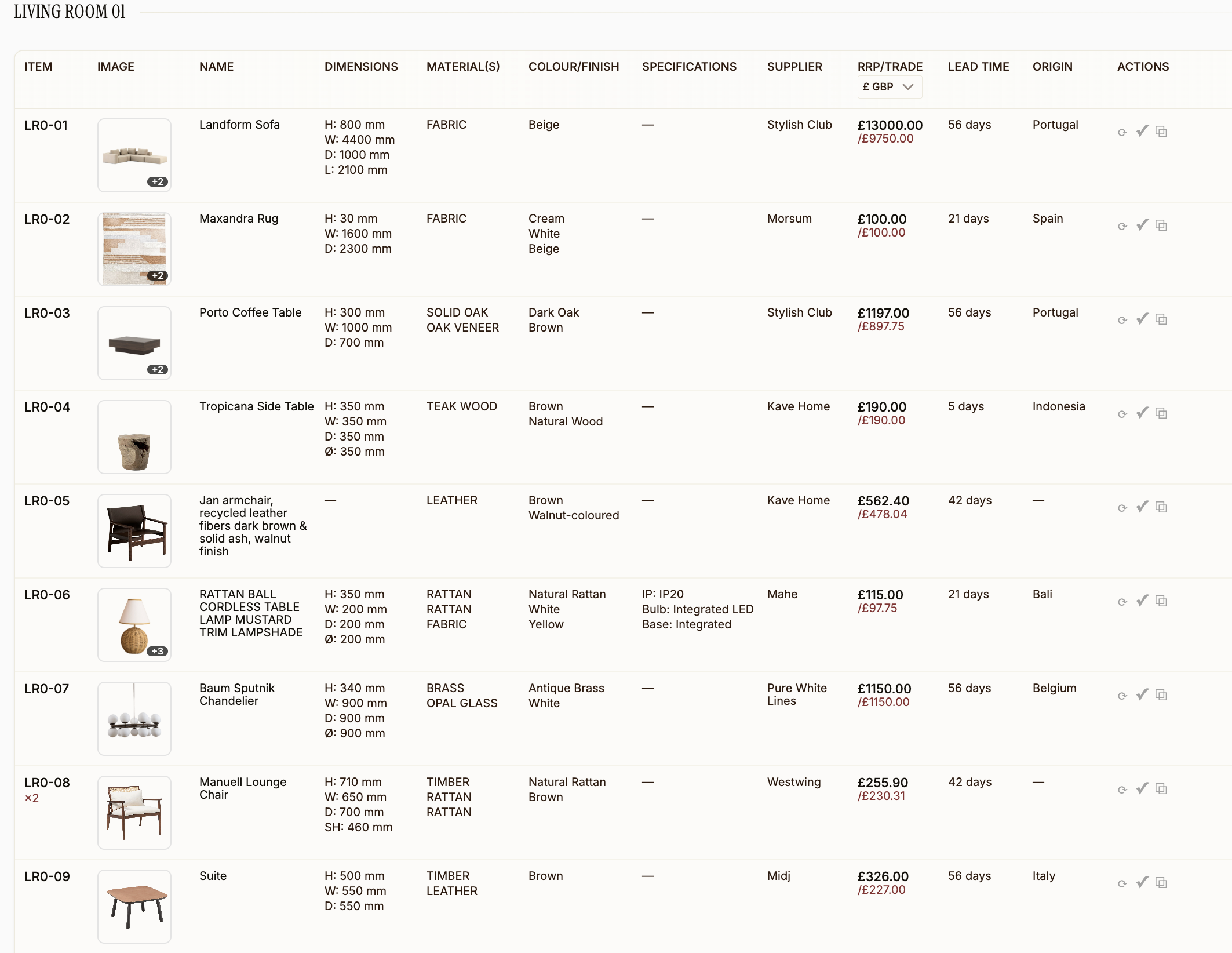
Procurist FF&E schedule for a living room showing product images, dimensions, materials, colour, specifications, supplier, trade pricing, lead times, and origin for each item

What Procurist does for your FF&E schedule

Auto-generate schedules

from uploaded floor plans, drawings, and project briefs

Real product data

specs, images, trade pricing, and lead times from vetted European suppliers

Web clipper

add products from any website in one click

Budget tracking

real-time trade pricing and margin calculations per item and per project

Auto-updating

schedules stay current when specs, pricing, or availability change

Downstream documents

presentations, quotes, invoices, and purchase orders from one schedule

You trained to design spaces. Not to fill in spreadsheets.

Are you still copying product dimensions from supplier websites into a spreadsheet, row by row, for every single item on your FF&E schedule?

Are you chasing suppliers for pricing that may already be outdated by the time it arrives in your inbox?

When your client changes their mind about the dining chairs, are you manually updating the schedule, then the quote, then the presentation, knowing one wrong number will ripple through every document?

Interior designers spend 15 to 25 hours per project on FF&E schedule creation and revisions alone. That is not design work. That is data entry, and it should not exist.

Interior designer reviewing material and fabric samples on the studio floor

You do not need a better FF&E schedule template. You need one that builds itself.

You do not fill it in. You review it.

Procurist generates a complete FF&E schedule directly from your uploaded designs and project briefs. Every row is populated with real product data, real specifications, and real trade pricing from a curated network of European furniture and lighting manufacturers. Dimensions, materials, finishes, lead times, supplier details, all formatted and accurate before you touch anything.

You focus on the creative decisions: whether the scale is right, whether the finish works with the palette, whether the piece tells the story you want it to tell. The sourcing, the data entry, the formatting, Procurist handles all of it.

From drawings to a complete FF&E schedule in three steps.
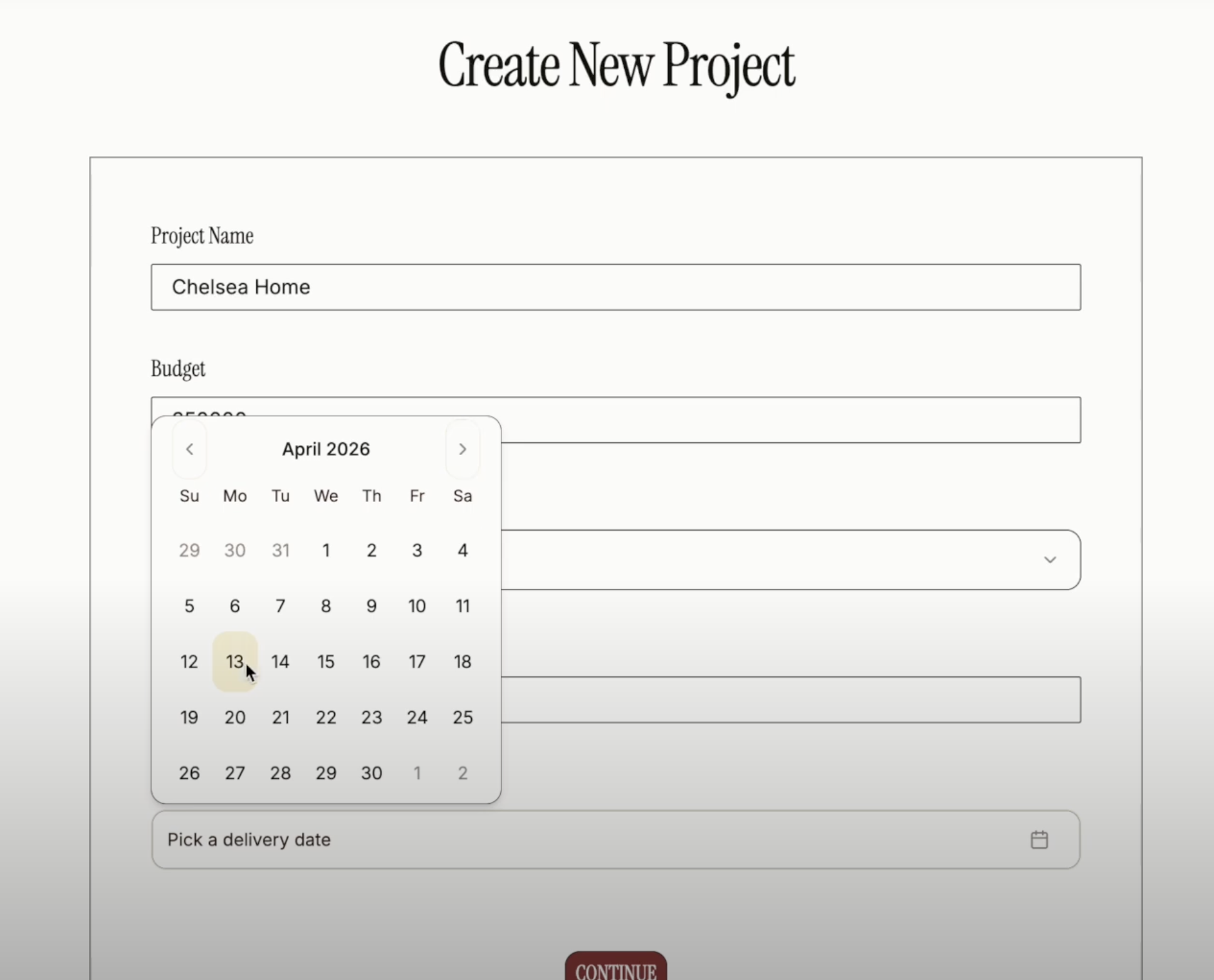
Procurist Create New Project screen showing project name, budget, delivery date picker, and continue button
Procurist FF&E schedule for a living room showing product images, dimensions, materials, specifications, supplier, trade pricing, and lead times
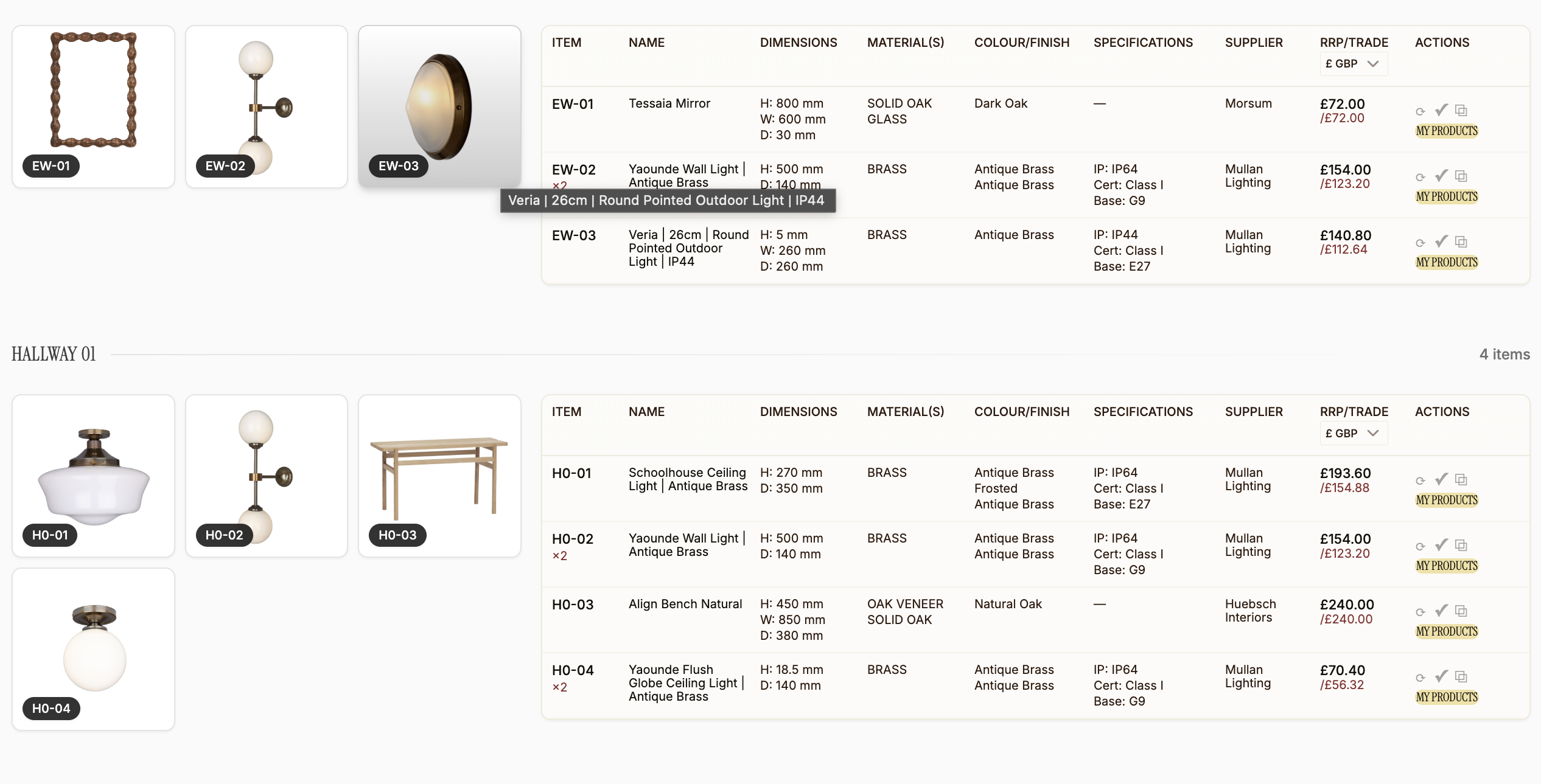
Procurist FF&E schedule showing entrance and hallway room sections with product images, item codes, dimensions, materials, specifications, supplier, trade pricing, and lead times
01

Upload your designs and project brief.

Floor plans, furniture layouts, mood boards, design drawings, project specifications. Upload whatever you have as PDF, JPG, or PNG and Procurist reads your project requirements, spatial context, and design intent.
02

Procurist generates your FF&E schedule.

The platform analyses your uploads and automatically creates a structured FF&E schedule template populated with matching products from European furniture and lighting brands on the Procurist marketplace. Every item includes full specifications, product images, trade pricing, lead times, and supplier details. All formatted, all accurate, all sourced from vetted manufacturers.
03

Review, refine, and add anything from anywhere.

You retain full creative control. Swap items, explore alternatives Procurist suggests in seconds, or add any product from anywhere on the internet with the web clipper. Your schedule updates in real time, and every change automatically flows through to your budgets, quotes, presentations, and invoices.

Everything your spreadsheet cannot do.

How does Procurist populate product data automatically?

All product data on your FF&E schedule comes directly from Procurist’s supplier database, where every listing is created and consistently updated by the brands themselves. This means specifications, dimensions, materials, finishes, images, trade pricing, lead times, and availability are always current, not copied from a catalogue that was last updated six months ago. When a brand updates a price or lead time, your FF&E schedule reflects it automatically. Beyond the marketplace, you can also import your own products from anywhere in a single click, either through Procurist’s integrated web clipper tool, which pulls product data directly from any supplier website, or by uploading items manually to your own private product library. Everything sits in one FF&E schedule, formatted consistently, whether it came from the Procurist marketplace or your own sources.
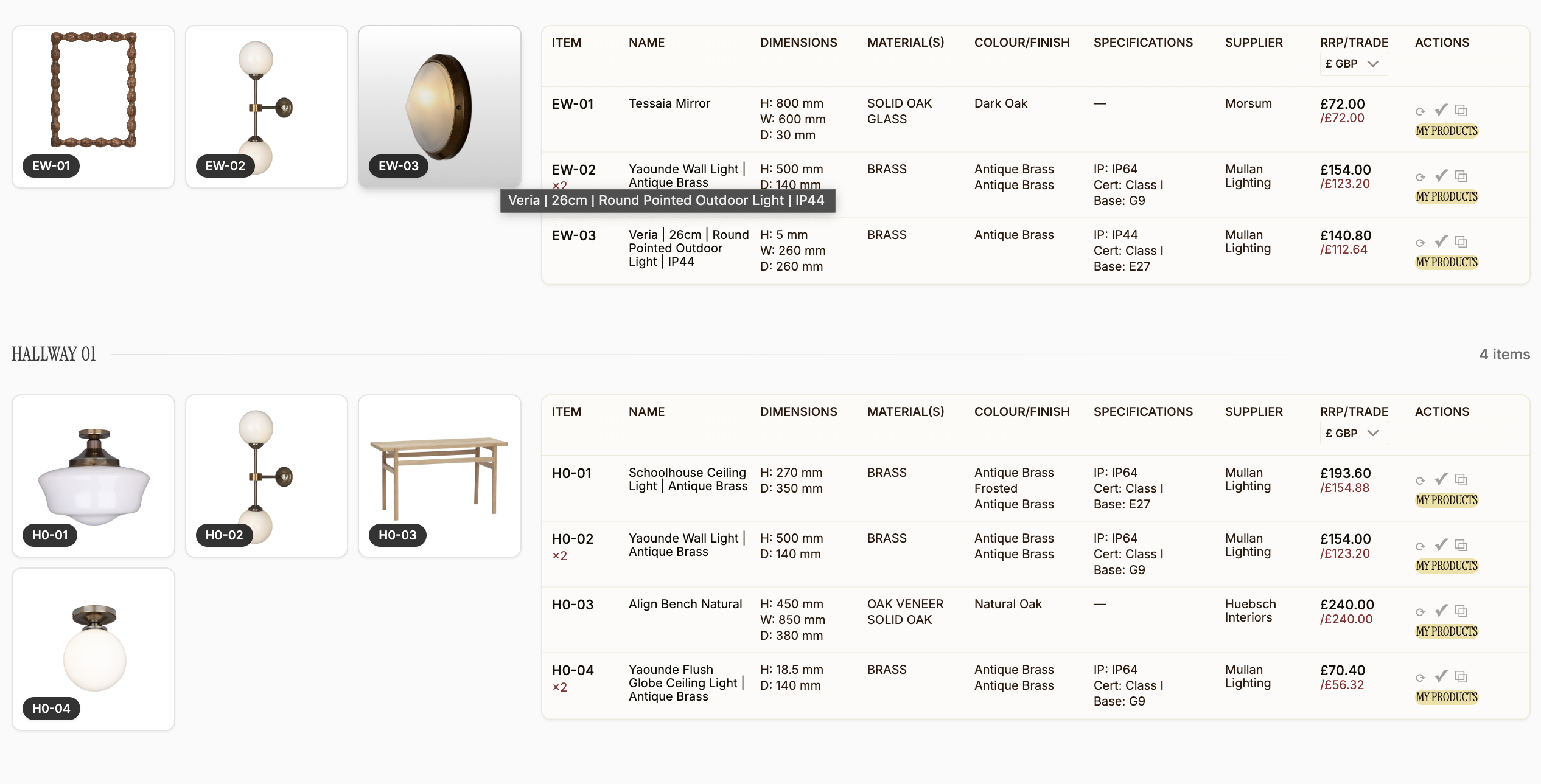
Procurist FF&E schedule showing hallway and entrance room sections with product images, item codes, dimensions, materials, colour, specifications, supplier names, RRP and trade pricing, and lead times

Find matching products in seconds.

Tell Procurist what you need, a dining table in solid oak for under £4,000 with a 6-week lead time, and the platform finds matching options across its entire supplier network instantly. No scrolling through catalogues. No browsing ten supplier websites hoping to stumble onto the right piece.
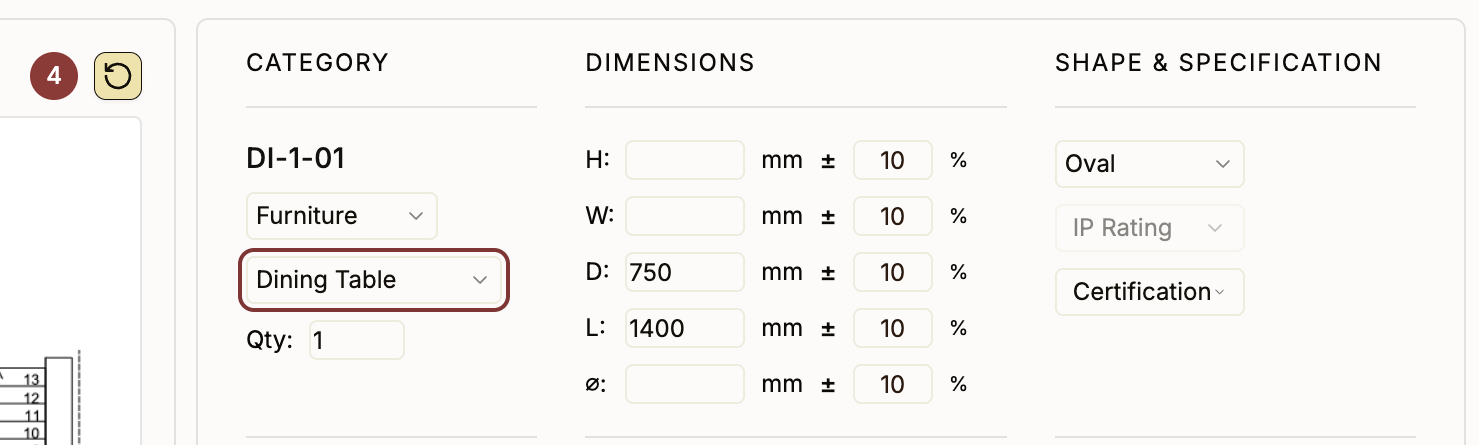
Procurist FF&E sourcing interface showing category, dimension, shape, and specification filters for finding matching products

Add any product from anywhere in a single click.

Found something on a supplier’s website, on Instagram, at a trade fair? Use Procurist’s web clipper to paste the link and automatically pull all product data and images into your schedule. Your own discoveries sit alongside marketplace products in one organised system, formatted consistently and ready to present.
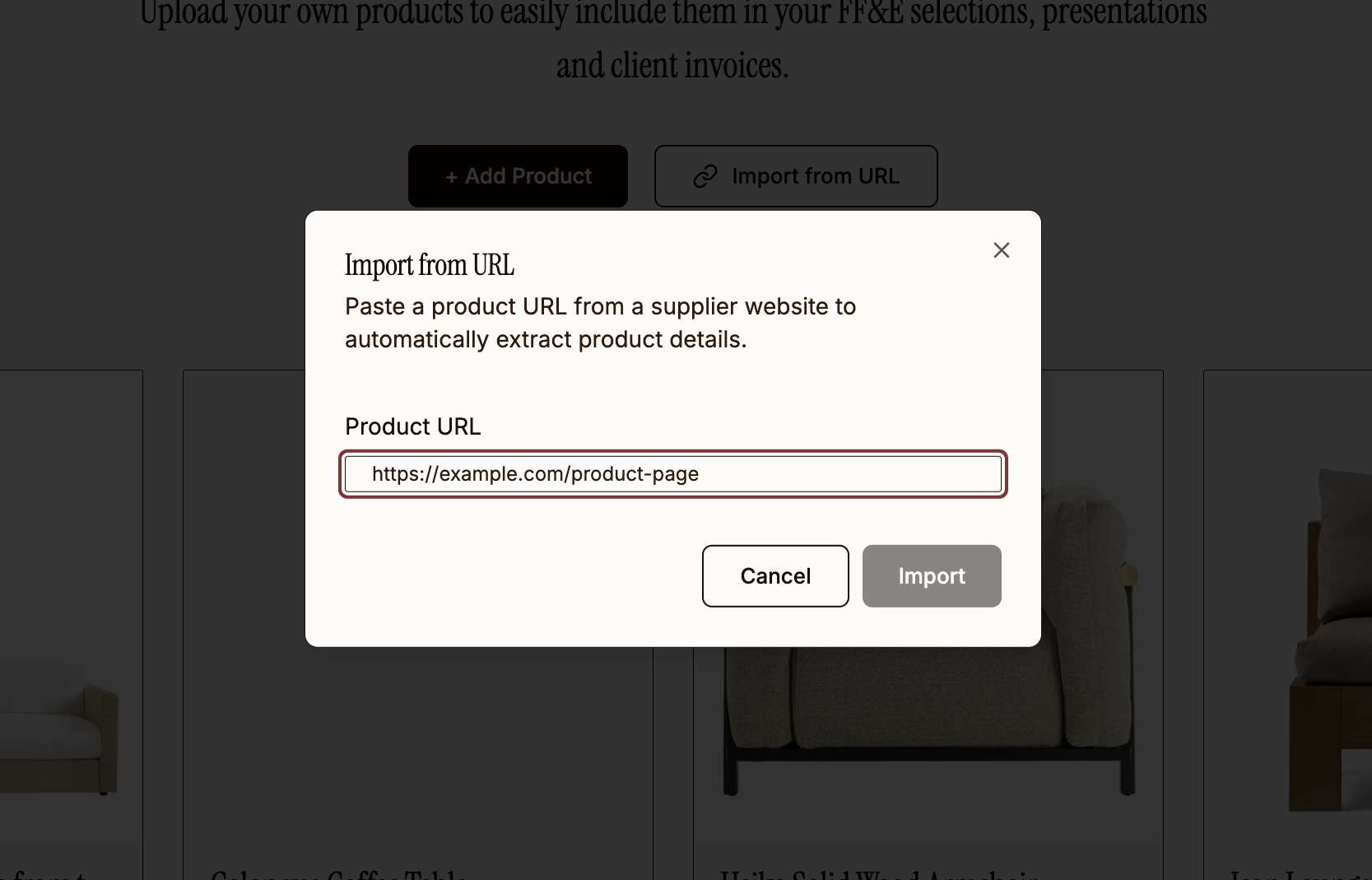
Procurist Import from URL dialog showing Add Product and Import from URL buttons with a product URL input field to automatically extract product details from any supplier website

How does Procurist keep your FF&E schedule up to date?

When specifications change, when pricing updates, when a product is discontinued, your FF&E schedule reflects it automatically. Lead times update in real time. Budget totals recalculate instantly. No more opening a spreadsheet to discover half the data is stale and spending an afternoon verifying every row before you can share it with your client.

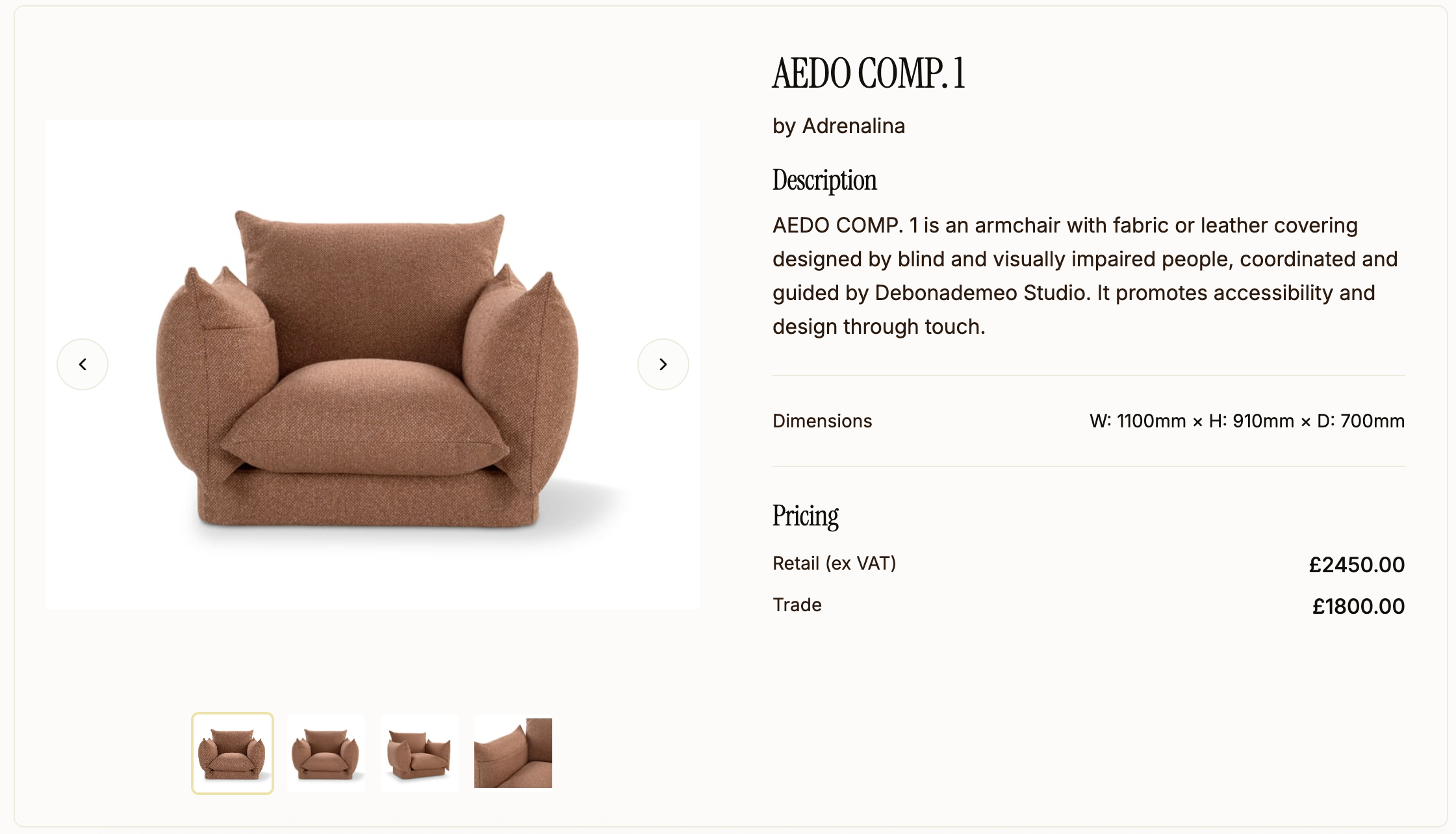
Procurist product detail page showing AEDO COMP.1 armchair by Adrenalina with product images, description, dimensions, retail and trade pricing

Connected to real products and real pricing.

This is not a blank grid you populate with guesses and estimates. Every item on your schedule is linked to a live supplier catalogue with verified trade pricing. Your FF&E budget is accurate from the moment the schedule generates, with trade margins calculated per item and per project, not three rounds of supplier emails later.

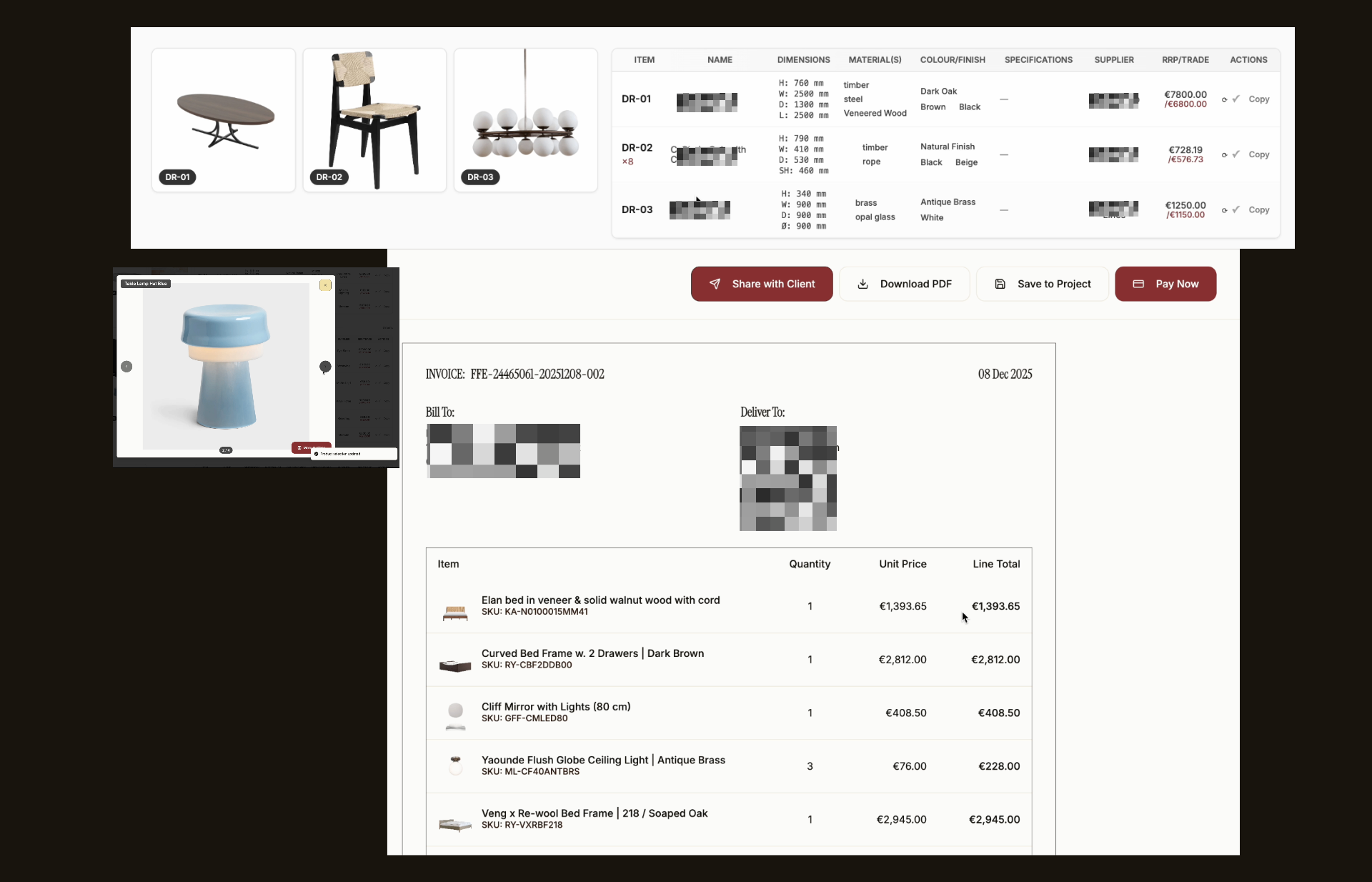
Procurist FF&E specifications with trade pricing, share with client, download PDF, and invoice generation features

The way you build FF&E schedules now vs. what it could look like.

Before: Manual FF&E schedule creation

  • Search for products across dozens of supplier websites, Pinterest boards, and Instagram saves
  • Request specifications and pricing via email, then wait days for a reply
  • Manually copy product data into a spreadsheet or PDF template, row by row
  • Format everything so it is presentable enough to share with your client
  • Client requests changes; update the schedule manually, then update the quote, then update the presentation
  • A price changes or a product is discontinued; start verifying data all over again
  • Track budgets and lead times in a separate spreadsheet that is always out of date
  • Spend 15 to 25 hours per project on schedule creation and revisions alone

After: FF&E schedule creation with Procurist

  • Upload your designs and brief; Procurist generates a complete schedule in minutes
  • Every product comes with full specifications, images, and verified trade pricing already populated
  • Find matching alternatives in seconds, add products from anywhere with the web clipper
  • Client requests changes; update the schedule and your quotes, presentations, and invoices update automatically
  • Budgets, lead times, and trade margins update in real time across the entire project
  • Product data stays current because it is connected to live supplier catalogues
  • Spend your time on design decisions, not data entry

Your FF&E schedule is just the beginning.

Change a product in your FF&E schedule and the update flows automatically into your client presentations, quotes, and invoices. Add an item and it appears everywhere it needs to be, formatted and priced correctly, without you touching another document.

  • Client presentationsAutomatically formatted and ready to share with your client, updated every time the schedule changes.
  • QuotesGenerated with accurate trade pricing and your margins calculated per item and per project.
  • Purchase ordersCreated directly from approved schedule items, with all supplier details and specifications included.
  • InvoicesGenerated from the same schedule data, so every number matches your quotes and purchase orders.
  • Order trackingDelivery status and logistics coordination for every item, managed from within the same workflow.
Giulia Burfeindt, founder of Procurist, at her studio desk

Built by a designer who spent one too many late nights finishing a revised FF&E presentation.

Procurist was designed inside an interior design studio, not a tech company. Our founder built the first version as an internal tool for her own team after spending years doing exactly what you are doing now: chasing suppliers for pricing, manually building schedules in spreadsheets, updating presentations at midnight because a client changed their mind about the console table.

She built Procurist because the existing tools, the project management software, the static templates, the sourcing platforms that only helped you discover products but still left you to do everything else manually, none of them actually did the work. They organised the work. But the hours were still yours.

Procurist was tested and iterated against real projects, real workflows, real deadlines, and the non-linear, sometimes chaotic way interior designers actually work, not the way software companies imagine they work. Every feature exists because a real project demanded it.

Questions designers ask before switching.

Your next FF&E schedule, generated in minutes, not weeks.

Upload your designs. Get a complete FF&E schedule populated with matching products, trade pricing, and full specifications from vetted European suppliers. Review it, refine it, and get back to the work you actually trained to do.